Dr VPN
Dr VPN

One-tap connection UI
First-launch country & language setup
Multi-protocol support (Xray-core based)



Key Features of Dr VPN
Transform your experience with Dr VPN's main features.
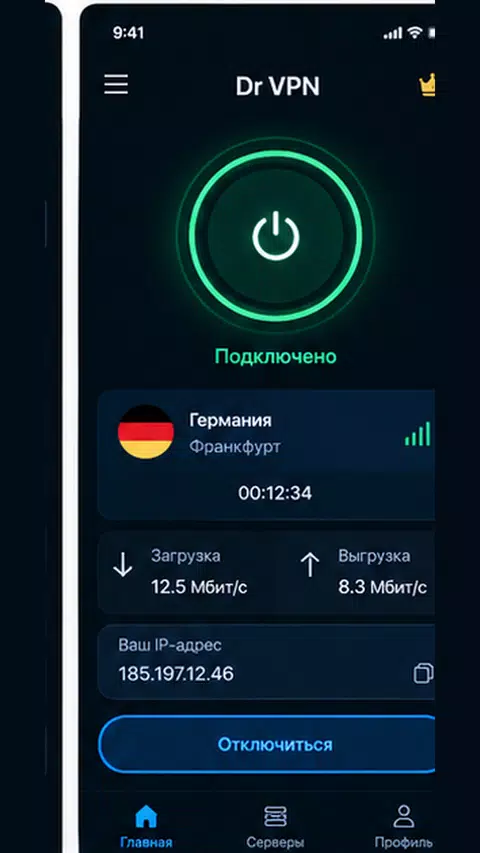
One-tap connection UI
Home screen centers on a large connect button plus your active subscription card and selected server card, so you can get online with a single tap.
Explore features and benefits.
Experience innovation at hand.
Download and start using.
First-launch country & language setup
On first run you choose your country and app language; local websites from your country can open directly (outside the tunnel) to stay fast.
Improved performance and stability.
Regular software updates.
Enhanced user experience.
Why choose Dr VPN
Streamline your life with Dr VPN today!

Multi-protocol support (Xray-core based)
Built on the Xray-core engine and supports common modern protocols: VLESS, VMess, Trojan, Shadowsocks, Hysteria2, WireGuard, SOCKS, and HTTP.

Easy subscription/config import
Add subscriptions or individual configs from a link, clipboard, QR code, or file for quick setup and migration.

Automatic server ping & filtering
Servers are pinged automatically and only working ones are shown by default, making it faster to pick a usable server.



Reviews about Dr VPN
Discover our users' feelings and comments.
I've been using Dr VPN for a while, and it’s amazing! The design is intuitive, and the features work seamlessly.

User 1
Nov 22, 2026
I can't get enough of Dr VPN! It’s fun and engaging. It’s worth every download!
User 2
Nov 11, 2026
Dr VPN has greatly enhanced my experience. The performance is top-notch. Five stars from me!
User 3
Oct 28, 2026
FAQs about Dr VPN
Browse the most frequently asked questions that you may interested in.
What is Dr VPN?
Dr VPN is a simple, open-source VPN client for Android built on the Xray-core engine. It provides a one-tap connect UI with a subscription card and selected server card to quickly get online.
Does Dr VPN include free VPN servers?
According to the official description, Dr VPN does not include servers of its own; you connect using a subscription (or configuration) from your VPN provider.
Which protocols does Dr VPN support?
The official site states it supports VLESS, VMess, Trojan, Shadowsocks, Hysteria2, WireGuard, SOCKS, and HTTP.
How do I add a subscription or configuration to Dr VPN?
You can add subscriptions or single configs from a link, the clipboard, a QR code, or a file.
Does Dr VPN offer per-app VPN/proxy controls?
Yes. Dr VPN includes per-app proxying so you can choose which apps use the VPN tunnel.
Does Dr VPN support routing rules or bypassing local sites?
Yes. It supports custom routing rules, and on first launch you can pick your country so local websites from your country can open directly without going through the tunnel.
How does server selection work in Dr VPN?
Servers are pinged automatically and only working servers are shown by default (with country flags). There is also an option to show every server.
Is Dr VPN free and open source? What license does it use?
Yes. The official description says the app is free and open source under the GPL-3.0 license.
Start your free trial for Dr VPN today!
Enjoy your everyday with Dr VPN.
Let's keep in touch!
Subscribe to our newsletter for the latest news and updates.
By subscribing, you agree to Dr VPN Privacy Policy.